
|
|
This is a simple modal analysis of a wing of a model airplane. The wing is of uniform configuration along its length and its cross-sectional area is defined to be a straight line and a spline as shown. It is held fixed to the body of the airplane on one end and hangs freely at the other. The objective of the problem is to find the wing's natural frequencies and mode shapes.
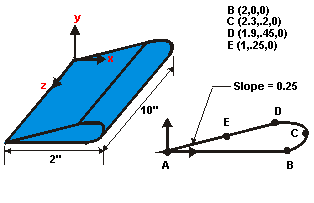
The dimensions of the wing are as shown above. The wing is made of low density polyethylene with a Young's modulus of 38x103 psi, Poisson's ration of 0.3, and a density of 1.033E-3 slugs/in3.
Assume the side of the wing connected to the plane is completely fixed in all degrees of freedom. The wing is solid and material properties are constant and isotropic.
Use solid modeling to generate a 2-D model of the cross-section of the wing, create a reasonable mesh and then extrude the cross-section into a 3-D solid model which will automatically be meshed.
To minimize the solid modeling time, simplify the creation of the 2-D airfoil profile. To accurately follow the contour of this airfoil would require making more data points.
Additionally, the mesh used in this example will be fairly coarse for the element types used. This coarse mesh is used here so that this tutorial can be used with the ANSYS/ED product.
Use the information in this description and the steps below as a guideline in solving the problem on your own. Or, use the detailed interactive step-by-step solution by choosing the link for step 1.
ANA SAYFAYA DÖNMEK İÇİN TIKLAYINIZ.