- Main Menu: Preprocessor
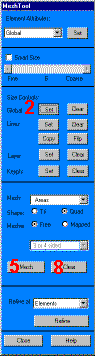
Mesh Tool
- Set global size controls -»
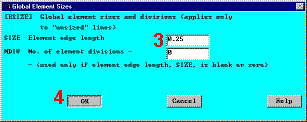
- Enter 0.25 for element edge length -»
- OK -»
- Mesh -»
- Pick All (in picking menu)
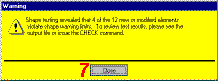
- Close -»

- Close Mesh Tool -»
- Toolbar: SAVE_DB
In designing this problem, the maximum node limit of ANSYS/ED was taken into
consideration. That is why the 4-node PLANE42 element, rather than the 8-node
PLANE82 element was used. Note that the mesh contains a PLANE42 triangle, which
results in a warning. If you are not using ANSYS/ED, you may use PLANE82 during the
element definitions to avoid this message. Note however that PLANE82 does not work
unless you get rid of the Global Element edge length (which was set to 0.25).
Note: The mesh you see on your screen may vary slightly from the mesh shown
above. As a result of this, you may see slightly different results during
postprocessing. For a discussion of results accuracy, see Chapter 2 of the ANSYS
Modeling and Meshing Guide.


|
 |
