Constraints will be applied to all nodes located where the wing is fixed to the body.
Select all nodes at z=0, then apply the displacement constraints.
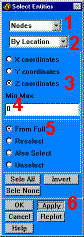
Choose Nodes -»
Choose By Location -»
Choose Z coordinates -»
Enter 0 for the Z coordinate location -»
Choose From Full -»
Apply -»
Main Menu: Preprocessor
Loads
-Loads- Apply
-Structural-Displacement
On Nodes
Pick All (in picking menu) to pick all selected nodes
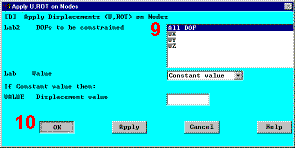
Choose All DOF -»
OK (Note: By leaving Displacement value blank, a default value of zero is
used.) -»
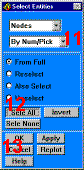
Reselect all nodes.
Choose By Num/Pick -»
Sele All to immediately select all nodes from entire database -»