8.  Extrude the meshed area into a meshed volume.

In this step, the 3-D volume is generated by first changing the element type to SOLID45, which is defined as element type 2, and then extruding the area into a volume.

  1. Main Menu:  Preprocessor
         -Modeling-Operate
              Extrude/Sweep
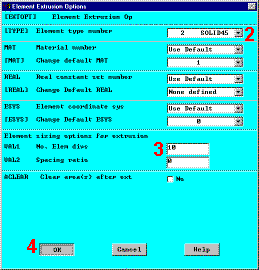
                   Elem Ext Opt
  2. Choose 2 (SOLID45) for Element type number 
  3. Enter 10 for the No. of element divisions 
  4. OK 
  5. Main Menu:  Preprocessor
         -Modeling-Operate
              Extrude/Sweep

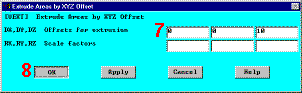
                   -Areas-By XYZ Offset
  6. Pick All (in picking menu)
  7. Enter 0,0,10 for Offsets for extrusion in the Z direction 
  8. OK 
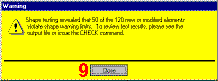
  9. Close 

Using SOLID45 to run this problem in ANSYS/ED will produce this warning message.   If ANSYS/ED is not being used, then SOLID95 (20-node brick) can be used as element type 2.   Using PLANE82 and SOLID95 produces a warning message about shape warning limits for 10 out of 127 elements in the volume.

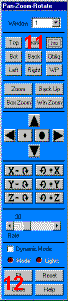
  1. Utility Menu:  PlotCtrls
         Pan, Zoom, Rotate
  2. Choose ISO 
  3. Close 

Results so far

  1. Toolbar: SAVE_DB

Previous   Next 

Element Extrusion OptionsExtrude Areas by XYZ Offset
WarningPan, Zoom, Rotate