- Main Menu: Preprocessor
-Modeling-Create
Keypoints
In
Active CS
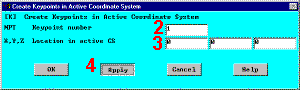
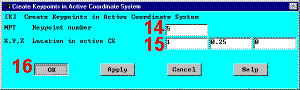
- Enter 1 for keypoint number (ANSYS will automatically number keypoints if this field is
left blank. This is generally preferred, but, for illustration, enter keypoint
numbers manually). -»
- Enter 0,0,0 for X,Y,Z location for keypoint 1. (Here, by leaving the fields blank,
ANSYS will take their default value of zero). -»
- Apply -»
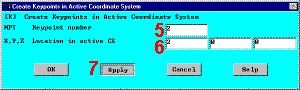
- Enter 2 for Keypoint number -»
- Enter 2,0,0 for X,Y,Z location -»
- Apply -»
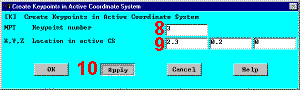
- Enter 3 for Keypoint number -»
- Enter 2.3,0.2,0 for X,Y,Z location -»
- Apply -»
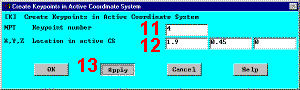
- Enter 4 for Keypoint number -»
- Enter 1.9,0.45,0 for X,Y,Z location -»
- Apply -»
- Enter 5 for Keypoint number -»
- Enter 1,0.25,0 for X,Y,Z location -»
- OK -»


|
|
