2. Change plot controls and replot.
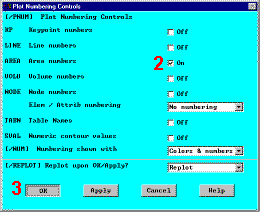
The area plot shows both rectangles, which are areas, in the same color. To more
clearly distinguish between areas, turn on area numbers and colors. The "Plot
Numbering Controls" dialog box on the Utility Menu controls how items are displayed
in the Graphics Window. By default, a "replot" is automatically performed upon
execution of the dialog box. The replot operation will repeat the last plotting operation
that occurred (in this case, an area plot).
|
|
- Utility Menu: Plot Ctrls
Numbering
- Turn on area numbers -»
- OK to change controls, close the dialog box, and replot -»

Before going to the next step, save what has been done so far. Any input data is stored
on the ANSYS database in memory. To save that database to a file, use the
save operation, available as a tool on the Toolbar. If you defined the jobname as bracket
in the launcher, the save operation will save the database as bracket.db. It is
important to do an occasional save so that if a mistake is made, the model can be restored
from the last saved state. The model is restored using the resume operation, also
available on the Toolbar. (Save and resume are also found on the Utility Menu, under
File.)
- Toolbar: SAVE_DB


|
 |
