
|
|
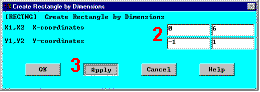
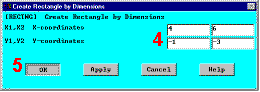
Interactive Step-by-Step SolutionBuild GeometryThis is the beginning of preprocessing. 1. Define rectangles.There are several ways to create the model geometry within ANSYS, some more convenient than others. The first step is to recognize that the bracket can be constructed easily with combinations of rectangles and circles primitives. Decide where the origin will be located and then define the rectangle and circle primitives relative to that origin.
The location of the origin is arbitrary. The center of the upper left-hand hole has been
chosen. ANSYS does not need to know where the origin is. Simply begin by
defining a rectangle relative to that location. In ANSYS, this origin is called the global
origin. |
|
|
  |


