Apply Loads - the beginning of the solution phase

A new, static analysis is the default, so we will not need to specify analysis type for this problem.  Also, there are no analysis options for this problem.

19.  Apply displacement constraints.

Displacement constraints can be applied directly to lines.

  1. Main Menu:  Solution
         -Loads-Apply
              -Structural-Displacement
                   On Lines
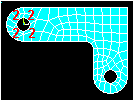
  2. Pick the four lines around left-hand hole (Line numbers 10, 9, 11, 12)

Picking locations

  1. OK (in picking menu)
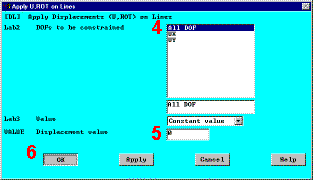
  2. Click on All DOF 
  3. Enter 0 for zero displacement 
  4. OK to apply constraints and close dialog box 
  5. Utility Menu:  Plot
         Lines

Results so far

  1. Toolbar:  SAVE_DB

Previous   Next 


Apply U, ROT on Lines