17.  Mesh the area.

One nice feature of the ANSYS program is that you can automatically mesh the model without specifying any mesh size controls. This is using what is called a default mesh. If you’re not sure how to determine the mesh density, let ANSYS try it first! Meshing this model with a default mesh however, generates more elements than are allowed in the ANSYS/ED program. Instead we’ll specify a global element size to control overall mesh density.

  1. Main Menu:  Preprocessor
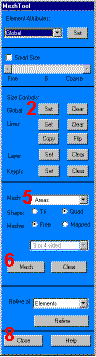
         Mesh Tool
  2. Set Global Size control 
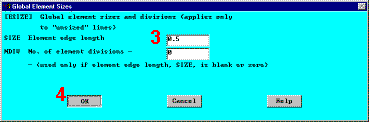
  3. Type in 0.5 
  4. OK 
  5. Choose Area Meshing 
  6. Click on Mesh 
  7. Pick All for the area to be meshed (in picking menu)
  8. Close the Mesh Tool 

Results so far

Note: The mesh you see on your screen may vary slightly from the mesh shown here. As a result of this, you may see slightly different results during postprocessing. For a discussion of results accuracy, see Chapter 2 of the ANSYS Modeling and Meshing Guide

Previous   Next 

Mesh ToolGlobal Element Sizes